Notes about cell-based architecture
The deployment layout of a distributed system
At OVHcloud, I operated the HBase cluster behind the Metrics platform, 255 machines taking 2 million writes and 6 million reads per second in a single cluster. HBase was fragile under network issues, and every incident triggered region split inconsistencies that hit every user of the platform at the same time. After HBase, I worked on etcd for Kubernetes control planes. Spawning three etcd nodes per customer is not a valid approach at scale, so we put hundreds of customers on each etcd cluster, and because of etcd's limitations, we had to move them manually and painfully across these clusters of three machines.
Both experiences come from the same recurring decision that everyone working on multi-tenant systems needs to make: how are you going to densify? Are you going to have a single, almighty distributed cluster to hold everything, or are you going to create a cluster per usage?
 one dense cluster           one cluster per usage

   A   B   C   D               A      B      C      D
   |   |   |   |               |      |      |      |
 +----------------+          +---+  +---+  +---+  +---+
 |    cluster     |          | 1 |  | 2 |  | 3 |  | 4 |
 +----------------+          +---+  +---+  +---+  +---+
 1 cluster to operate        4 clusters to operate
 failure hits A,B,C,D        failure hits 1 usage
Big clusters are efficient in terms of SRE time and infrastructure cost, but they have a big impact when they fail. One cluster per usage keeps the blast radius of a failure minimal, and you pay for it with one more cluster to operate for every usage. Can we have something in the middle? The AWS whitepaper on the topic, written by Robisson Oliveira in September 2023, asks a pretty interesting question:
"Is it better for 100% of customers to experience a 5% failure rate, or 5% of customers to experience a 100% failure rate?"
AWS's answer to this problem is cell-based architecture.
Overall cell design
The main idea is to design your system so that customers have a single entry point, but internally, they are routed to different backends, called cells:
               clients
                  |
           +-------------+  map   +---------------+
           | thin router | <----- | control plane |
           +-------------+        +---------------+
            /     |     \
      +------+ +------+ +------+
      |cell 1| |cell 2| |cell 3|
      +------+ +------+ +------+
A cell is a complete copy of your workload that shares no state with the others: its own storage, its own deployment and its own failure domain, with no calls to the other cells and no shared database or bucket. A cell can be lost, drained or upgraded without the other cells noticing, and this is what each etcd cluster was at OVHcloud for its own set of customers.
The thin router only sends each request to the right cell based on a partition key, like the customer ID. It is the one component shared by every cell, so its failures are not divided by anything, and this is why the whitepaper wants it to be the "thinnest possible layer".
The control plane provisions cells and migrates customers between them, and it stays off the request path, because routers keep serving on the last map it published even when it is down.
Load and blast radius are divided by the number of cells, except at the router, and it does not have to mean more infrastructure: 30 hosts can stay 30 hosts, grouped behind a router. When cells hold data, the design comes down to spreading data and moving it.
The partition key
Choosing the key
To spread customers across cells, you need a key to shard on, and the obvious candidate in a multi-tenant system is the tenant:
           +-------------+
           | thin router |
           +-------------+
            /     |     \
      +------+ +------+ +------+
      |cell 1| |cell 2| |cell 3|
      | A, D | | B, E | | C, F |
      +------+ +------+ +------+
The problem is that a tenant can never outgrow its cell, so the largest tenant decides the size of every cell. The whitepaper suggests adding a second dimension to the key, aligned with your business and next to the customer ID, so a large tenant can spread over several cells.
Whatever the key, the router must find it cheaply in every request, otherwise it stops being thin. For our Kubernetes control planes, a proxy read the tenant from the TLS client certificate of each API server, and it also handled per-tenant monitoring and quotas.
Mapping keys to cells
The router applies the mapping from partition key to cell on every request, and the same mapping decides how many tenants move every time a cell is added. The naive transformation is to hash the partition key and take it modulo the number of cells. The problem is that adding a cell then moves a lot of tenants on day one, and going from 3 to 4 cells in this example moves every single one of them:
| Tenant | hash(key) | 3 cells (mod 3 + 1) | 4 cells (mod 4 + 1) |
|---|---|---|---|
| A | 17 | Cell(3) | Cell(2) |
| B | 22 | Cell(2) | Cell(3) |
| C | 27 | Cell(1) | Cell(4) |
| D | 40 | Cell(2) | Cell(1) |
| E | 53 | Cell(3) | Cell(2) |
| F | 68 | Cell(3) | Cell(1) |
A better way is to hash into a fixed number of buckets, here 12, that does not change when cells are added:
| Tenant | hash(key) | hash mod 12 | Bucket |
|---|---|---|---|
| A | 17 | 5 | Bucket(5) |
| B | 22 | 10 | Bucket(10) |
| C | 27 | 3 | Bucket(3) |
| D | 40 | 4 | Bucket(4) |
| E | 53 | 5 | Bucket(5) |
| F | 68 | 8 | Bucket(8) |
The 12 buckets are for readability, real systems use far more, like the 16384 hash slots of Redis Cluster, and the whitepaper gives an order of magnitude rather than a recommendation:
"A general use of consistent hash in cell mapping is a system that is configured with a fixed large number (for example, tens of thousands) of logical buckets which are explicitly mapped to much smaller number of physical cells."
Each bucket is then assigned to a cell, and the tenants follow their bucket:
| Buckets | State | Tenants |
|---|---|---|
Bucket(0) to Bucket(3) | Assigned(Cell(1)) | C |
Bucket(4) to Bucket(7) | Assigned(Cell(2)) | D, A, E |
Bucket(8) to Bucket(11) | Assigned(Cell(3)) | F, B |
Adding a fourth cell then means moving one bucket from each existing cell, and only C, sitting in Bucket(3), has to move:
| Bucket | State | Tenants |
|---|---|---|
Bucket(3) | Moving(From(Cell(1)), To(Cell(4))) | C |
Bucket(7) | Moving(From(Cell(2)), To(Cell(4))) | |
Bucket(11) | Moving(From(Cell(3)), To(Cell(4))) | |
| all others | unchanged |
The hash step never changes, so the bucket is a stable identity for a tenant, and adding or removing a cell only touches the bucket-to-cell table. The bucket count is the grain of a move: with 12 buckets the smallest move is a twelfth of the data, with tens of thousands it is a tiny slice, which is why the whitepaper's number is that large. A new tenant needs no write at all, its hash lands in a bucket that already points to a cell, so the control plane is not on the path of the first request. The whitepaper's other option, a full map with one row per tenant, has to be written before that first request and grows with the number of tenants.
The override table
We still need an override table for testing, quarantine and heavy tenants, and the whitepaper makes it a rule: "Regardless of partition mapping approach, it's important to also use an override table to force specific keys to specific cells". In our example it looks like this:
| Tenant | State | Reason |
|---|---|---|
| A | Assigned(Cell(5)) | heavy tenant, gets a dedicated cell, E stays in Bucket(5) |
| internal-* | Assigned(Cell(4)) | testing, internal tenants land on the newest cell first |
| G | Assigned(Cell(6)) | quarantine, poison pills |
The router checks the override table first and falls back to the bucket table, which has a fixed number of rows whatever the number of tenants. The override table only holds the exceptions, so the whole directory fits in the memory of every router and can be published as a single document.
Sizing and shaping cells
The next question is "how big should a cell be?", and this is a tough one, because it mixes technical and business decisions. I ended up with this kind of long list of axes to look at, and one cell needs to be:
- big enough to accept the largest workloads without splitting a customer across cells,
- big enough to gain economies of scale and amortize the fixed cost of a cell,
- big enough to keep the number of cells operable,
- small enough that losing or draining one cell is a small share of customers,
- small enough to stay below the quotas and the scaling cliffs you have not met yet,
- known and enforced, expressed in transactions per second, tenants or GB stored, with load shedding at the limit,
- operated with headroom, half the tested ceiling, so spikes, failovers and incoming moves have room.
These axes pull against each other, with the business side pushing the size up, because a bigger cell lowers the cost per tenant and leaves room for the next big customer. The whitepaper's cell sizing section weighs the same trade-off, with smaller cells giving more cells to manage and a smaller share of customers per outage, and larger cells giving better utilization and fewer customers split across cells. At OVHcloud, the axis that bit me was the scaling cliff of etcd, whose whole keyspace must fit on every member under a recommended 8GB limit.
With FoundationDB, the known limitations are written down:
FoundationDB has undergone performance testing and tuning with clusters of up to 500 cores/processes
FoundationDB has been tested with databases up to 100 TB
These are the hard technical limitations, but inside them there are a lot of things we can choose for a FoundationDB-based cell, like the redundancy mode, the hardware, the storage engine, the major version, and more. Mixing these choices could give us something like this, which is a design exercise and not what we run at Clever Cloud today:
                   thin router
                        |
       +-----------+----+------+-----------+
       |           |           |           |
  +---------+ +---------+ +---------+ +---------+
  | cell 1  | | cell 2  | | cell 3  | | cell 4  |
  | triple  | | double  | | 3 halls | | triple  |
  | ssd-2   | | ssd-2   | | redwood | | redwood |
  | SATA    | | SATA    | | NVMe    | | NVMe    |
  | 7.3     | | 7.3     | | 7.3     | | 7.4     |
  +---------+ +---------+ +---------+ +---------+
  shared      cheap       critical    canary
  tenants     tier        low volume  internal
The shared tenants live on triple redundancy, and the cheap tier runs double redundancy, also on SATA, for tenants who accept fewer copies of their data in exchange for a lower price. Critical tenants with a low volume get a cell spread over three data halls, on NVMe with the Redwood storage engine, so the cell survives the loss of a whole data hall. The canary runs 7.4 and takes the internal tenants first, which is the internal-* row of the override table pointing to Cell(4).
None of these choices is final: the cheap cell fills up, the canary becomes a regular cell once the release is trusted, a tenant outgrows the shared cell, and each revision means moving tenants from one shape to another.
Moving data is the core capability, and the worst one
On the etcd clusters at OVHcloud, which I talked about at KubeCon, what forced a move was almost always a noisy neighbor, usually a Kubernetes operator in one customer's cluster that was a bit too aggressive with etcd. Moving that customer was an offline and manual procedure, where we blocked writes, copied the data to another etcd cluster, verified it, switched traffic and deleted the old copy. The noisy cell was already struggling, so sometimes the copy made both cells unstable.
Almost every operation on a cell-based system is a move, from rebalancing and evacuating a failing cell to isolating a noisy tenant or adopting cells in the first place, which is why the whitepaper's best practice is "Start with a cell migration mechanism from day one". Apple does it in CloudKit, where Scott Gray describes moving contiguous key ranges between FoundationDB clusters to rebalance load.
The whitepaper names the steps of a move clone, flip, redirect and forget, which in the bucket tables above is one row going from Assigned to Moving and back. We blocked writes during the whole copy, and in the live migration Peter Vosshall describes in the ARC338 talk at re:Invent 2018, writes are only blocked for a brief final sync, and shrinking that window is the hard part.
A move touches two cells at once, which breaks the rule Peter Vosshall says every new AWS engineer learns, never touch more than one zone at a time, so the receiving cell needs headroom before the copy starts. It also has consequences above the storage layer: CloudKit syncs devices with an index ordered by FoundationDB commit versions, which are uncorrelated between clusters, so Apple added a per-user count of moves called the incarnation, as the Record Layer paper at SIGMOD 2019 explains.
The control plane is a tenant
If every piece of the system must move, the control plane must move too, otherwise its cell becomes the one you can never drain or retire. Scott Gray's CloudKit talk also shows how Apple runs it on FoundationDB and the Record Layer:
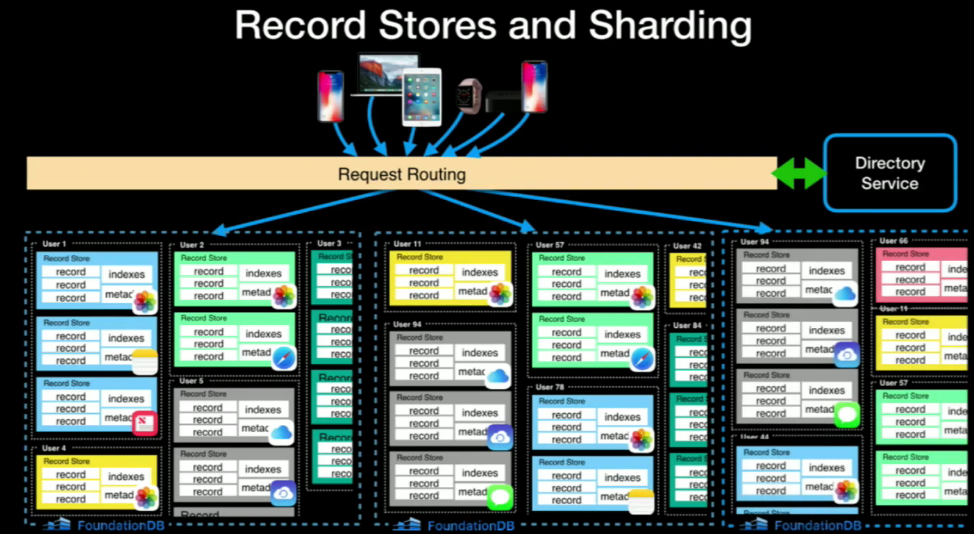
Each FoundationDB cluster is a cell holding millions of users and tens of millions of record stores, one per user and per application, and each record store is a virtual database with its records, indexes and metadata in one contiguous range of keys. A directory service keeps track of which cluster owns each user, and I have no insight into how Apple runs it, but I see no reason why it has to be an external system. When I look at this picture, the control plane is only one more specialized record store somewhere in the infrastructure, a tenant like any other:
               clients
                  |
           +-------------+  map   +---------------+
           | thin router | <----- | control plane |
           +-------------+        +---------------+
            /     |     \                 |
      +------+ +------+ +------+          |
      |cell 1| |cell 2| |cell 3|          |
      |  C   | | A,D,E| | B, F |          |
      |      | |  CP  | |      |          |
      +------+ +--^---+ +------+          |
                  |                       |
                  +-----------------------+
              control plane state = tenant CP
This works when the control plane data fits the tenant split and the cells are strongly consistent, which is the case with FoundationDB. It then becomes an application of the eat your own dog food principle: the control plane lives in the same cells, with the same guarantees and the same moves as every customer. It also forces you to handle the move of your most critical tenant, and to do it fast, because while the control plane moves, nobody can move anyone else. Routers keep serving on their last published map in the meantime, so traffic does not stop.
Operating many cells
For operators, the main goal of all this is to keep each distributed system under a load that makes operations easy. Running a system at 80 or 90% of its capacity leaves no room for failures, incidents and spikes, and at OVHcloud I got paged too often when etcd hit its performance ceiling. With cells, a cell close to its ceiling moves tenants out, so the move is what keeps every cell at a load where an incident or a spike still fits.
Adopting cells does not need a big migration either. The whitepaper says "Your current instance/stack is your cell zero", so you put a router in front of what you already have, and the first migration out of it is your first move.
The rest is automation from day one, deployments in waves starting with the canary cell, and cell-aware observability. The isolation only helps if operations respect it, and in ARC338 Peter Vosshall recalled the 2017 S3 outage, where an engineer who knew the philosophy still made a command-line mistake.
At what load do your clusters run today, and could you move a tenant out of the hottest one tomorrow?
Feel free to reach out with any questions or to share your experiences with cell-based architecture. You can find me on Twitter, Bluesky or through my website.